6.3.2.6. 2D Collision Avoidance
Ver. 1.0.2 (2024-07-16)
This module provides a 2D environment for collision avoidance of a trajectory planning with dynamic goals. The DynamicTrajectoryPlanner environment simulates a 2D space where an agent must navigate towards dynamically moving goals while avoiding static obstacles.
The agent, equipped with sensors providing information only on initial to goal trajectories, operates within a continuous action space to move and adjust its path.
In this module, rewards are not defined but we give some important components for developing the reward function including actual distance of the trajectory and number of collisions that can be used to penalise for any collisions.
This environment is dynamic, with goals potentially changing over time, which makes it ideal for training reinforcement learning agents for tasks like autonomous robot navigation, drone flight in urban areas, and autonomous vehicle path planning, which emphasize trajectory optimization and collision avoidance in real-world-like settings.
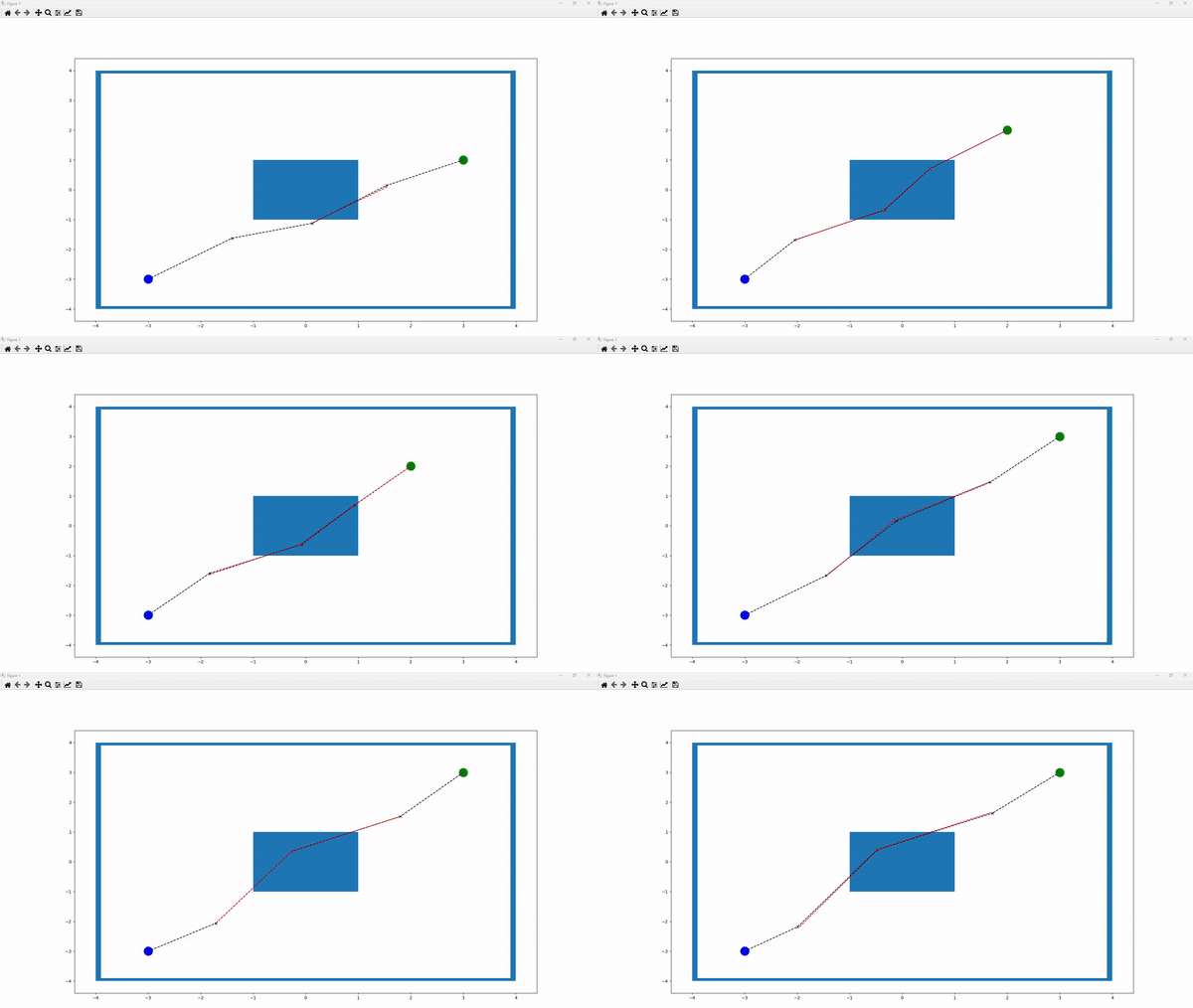
The above figure illustrates a sample running environment. In this environment, the blue box in the center represents a collision. The blue node indicates the starting point, while the green node denotes the target. The “x” nodes represent intermediate nodes generated to create a path between the starting and target nodes. Paths between nodes are depicted as linear connections. A black line between two nodes signifies a collision-free path, whereas a red line indicates a collision along the path. Additionally, red “x” nodes denote nodes involved in collisions, while black “x” nodes indicate non-colliding nodes.
The number of points can be defined by the parameter p_cycle_limit. For example, if p_cycle_limit is set to 5, the environment will include a starting node, a target node, and 3 “x” nodes. Users can also define the size of the environment by adjusting the p_xlimit and p_ylimit parameters of the frame. The starting node is specified by the p_start_pos parameter. The target node, however, is dynamic, allowing multiple target nodes to be chosen randomly each time the environment is reset. This list of target nodes is defined by the p_multi_goals parameter. Additionally, obstacles can be repositioned by modifying the p_obstacles parameter.
Every time the environment is reset, we begin with a straight line where the “x” nodes are placed equidistantly along the linear path from the starting node to the target node. The objective is to adjust the positions of the “x” nodes to avoid collisions and to find the shortest possible path.
The 2D collision avoidance environment can be imported via:
from mlpro.rl.pool.envs.collisionavoidance_2D import DynamicTrajectoryPlanner
Prerequisites Please install below packages to use the MLPro’s 2D collision avoidance environment
General information
Parameter |
Value |
|---|---|
Agents |
1 |
Native Source |
MLPro |
Action Space Dimension |
[p_num_point-2,2], default: [3,2] |
Action Space Base Set |
Real numbers |
Action Space Boundaries |
p_action_boundaries, default: [-0.02,0.02] |
State Space Dimension |
[p_num_point,2], default: [5,2] |
State Space Base Set |
Real numbers |
State Space Boundaries |
x-axis: p_xlimit, default: [-4,4]. y-axis: p_ylimit, default: [-4,4]. |
Reward Structure |
Individual reward for each agent |
Action space
In this environment, we control the movement of the “x” nodes along the x- and y-axes, which is defined as the action of the agent. Therefore, the action space dimension of the agent is [p_num_point-2, 2]. For instance, if p_num_point is 5, the action space dimension is [3, 2]. Additionally, the action boundaries are defined by the parameter p_action_boundaries during the initialization of the environment. This means that each “x” node can only move within these boundaries along the x- and y-axes at each time step.
State space
The state information in this environment consists of the positions of each node, including the starting node, the current positions of the “x” nodes, and the current target node. Each position includes both x- and y-coordinates. Therefore, the state space dimension is [p_num_point, 2]. For example, if p_num_point is 5, the state space dimension is [5, 2].
Reward structure
Currently, there is no predefined reward function in this environment. Users who wish to create a custom reward function can refer to the following code snippet as a guide:
class MyDynamicTrajectoryPlanner(DynamicTrajectoryPlanner):

    def _compute_reward(self, p_state_old:State, p_state_new:State) -> Reward:

        number_of_collide_points = 0
        number_of_collide_lines = 0
        for _ in self.collide_point_list:
            number_of_collide_points += 1
        for _ in self.collide_line_list:
            number_of_collide_lines += 1

        distance = self._calc_distance()

        total_rewards = 0

        reward = Reward()
        reward.set_overall_reward(total_rewards)

        return reward
The provided code snippet outlines parameters that can assist in calculating custom reward functions:
number_of_collide_points: Represents the count of points colliding with obstacles.
number_of_collide_lines: Indicates the number of lines colliding with obstacles.
distance: Refers to the current trajectory distance from the starting to the target nodes through all “x” nodes.
Users can define their own reward function by replacing total_rewards=0 with their specific logic.
Cross reference
Citation
If you apply this environment in your research or work, please cite us.